Meta Platforms, Inc.Art & Design
4.893.00 Reviews
- Version
- 38.0.0.1.107
- Installs
- 100.00K
- Age Rating
- Teen
Screenshots
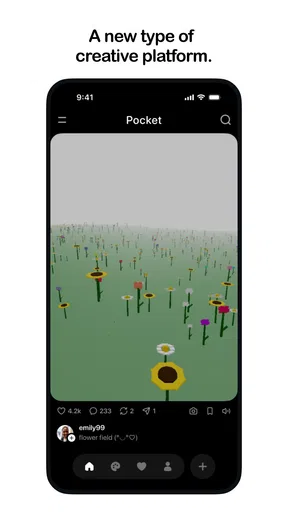
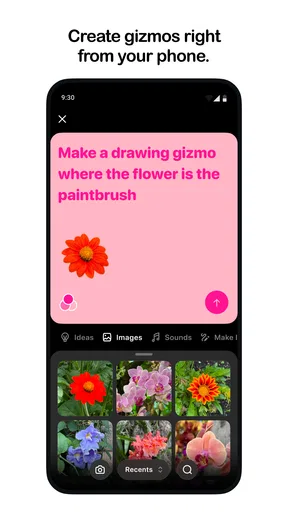
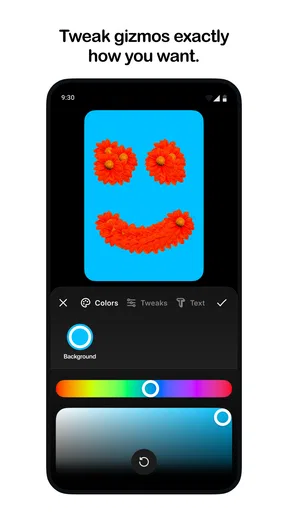
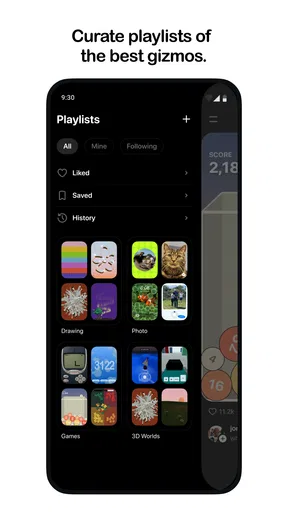
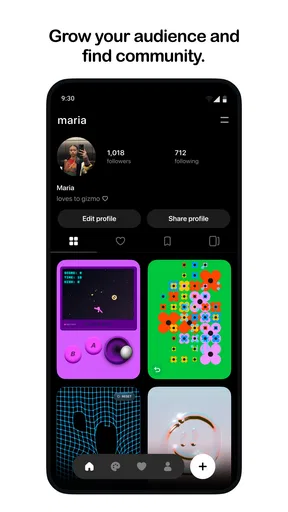
Our Review of Pocket
 Analysis by Appyee
I approached Pocket as a small creative workspace rather than as a conventional drawing or editing tool. Its purpose is simple on paper: make and share “gizmos.” In practice, that wording points to a more playful kind of creation, where the finished idea matters as much as the process of building it. I found the app most interesting when I treated it as a place for quick experiments, visual notes, and shareable little creations instead of expecting a full professional design suite.
That distinction matters before you install it. Pocket is a free Art & Design app from Meta Platforms, Inc., aimed at Teen users and available on devices running OS 10 or later. The current version is 26.0.0.0.50. It has reached over ten thousand installs and holds a 4.9 average from around 760 ratings, although the review count is still small. Those figures suggest a positive early reception, but I would still judge it by whether its creative workflow matches your habits rather than treating the rating as proof that it replaces established design software.
From a rough idea to something worth sharing
I find the best way to judge Pocket is to begin with the small creative task it appears designed for, rather than expecting it to behave like a full art studio. In this section, I’ll look at how a rough thought can become a useful visual draft, and why keeping that first attempt deliberately modest can make the process feel more rewarding.
Starting with an ordinary creative problem
The most convincing use case for Pocket begins with a familiar situation: I have an idea that is too visual for a text note but too rough to justify opening a heavyweight design program. It might be a playful interface concept, a tiny visual message, a mood-board fragment, or a simple object that I want another person to react to. Traditional alternatives often create too much distance between the thought and the first draft. A full editor brings panels, file decisions, export choices, and a learning curve before the idea has even taken shape.
Pocket feels better suited to that first moment. The name and short store description position it as something compact, and I think that compactness is its main appeal. I can approach a creation as a small object with a clear purpose instead of beginning a long project. That makes the app useful for people who think by making: people who need to see an idea before they know whether it is good.
I would not begin here if my goal were print production, detailed photo retouching, complex vector illustration, or a carefully managed professional asset library. Those tasks usually benefit from precise controls and established file workflows. Pocket makes more sense when speed, approachability, and the pleasure of trying something unusual are more important than exhaustive control.
Building the first gizmo without overplanning
My preferred way to use an app like this is to start with a narrow outcome. Instead of opening it and asking what it can do, I decide what I want to communicate: a visual joke, a quick concept, a reaction, or a small composition that can stand on its own. That approach prevents the blank workspace from becoming a browsing exercise. Pocket is at its best when the user arrives with a small intention and lets the making process shape the result.
The first useful habit is to keep the initial version deliberately incomplete. I would make the recognizable core first, then check whether the idea works before spending time polishing it. This is a non-obvious advantage of a pocket-sized creative platform: it encourages a lower-cost first attempt. If the concept fails, I have learned something without investing the time that a larger application tends to demand.
A second habit is to separate “interesting” from “finished.” A gizmo can be visually amusing while still being confusing to someone seeing it for the first time. Before sharing, I would look at it as a recipient rather than as its maker. Is the main action obvious? Does the composition communicate without an explanation? If a friend needs a long message to understand it, the creation probably needs one more pass.
This is where Pocket can be more inviting than ordinary note-taking. A text note records an idea, while a small visual creation can expose its mood, structure, and personality. On the other hand, visual work also introduces ambiguity. The same freedom that makes experimentation enjoyable can make the result less predictable. Users who prefer fixed templates and exact instructions may find the open-ended approach less comfortable.
A realistic everyday workflow
Imagine I am waiting for a friend to approve a concept for a small social post. I have a rough thought in my head, but describing it in a chat would take several messages. I open Pocket, create a compact visual version, and use that draft to test the idea. The first pass is not meant to be the final artwork. Its job is to give the conversation something concrete to react to.
That changes the conversation. Instead of asking, “Does this description make sense?” I can ask, “Does this direction feel right?” The recipient can respond to the actual visual idea, and I can revise based on a specific reaction. This is a strong use case for a creative app that sits between a sketchpad and a sharing tool. It helps turn vague discussion into a visible handoff.
I also see value for personal organization. A Pocket creation could act as a visual reminder for a project, a tiny reference for a later design, or a playful way to capture an idea that would otherwise disappear. The important trade-off is that the app should support the thought rather than become another place where unfinished material accumulates. I would keep each creation tied to a clear purpose and share or archive it once that purpose is met.
Handing the creation to another person
The sharing stage is where the app’s promise becomes practical. Making something privately is only half the workflow; a gizmo becomes more useful when another person can see it and respond. I would prepare the handoff by adding a short explanation when the visual could be interpreted in more than one way. That is not a weakness unique to Pocket. It is simply the cost of using a visual language that leaves room for personal interpretation.
For collaborative work, I would send the creation with one focused question. Asking for general feedback often produces vague reactions. Asking whether the main idea is clear, whether the tone feels right, or which version is stronger gives the recipient a useful job. Pocket can support that kind of lightweight collaboration because the creation is small enough to discuss quickly, but it should not be mistaken for a complete project-management system.
The handoff also reveals an important limitation: the value of the result depends on the receiving context. A friend who enjoys playful visual communication may immediately understand the appeal. A client expecting formal specifications may need a more conventional mockup, detailed annotations, or an editable source file. In that situation, I would use Pocket for the early idea and move the approved direction into a more precise tool.
For a group, I would establish a simple naming habit outside the creative act itself, such as describing the purpose in the message that accompanies the shared item. Small creative platforms can become confusing when several drafts look similar. A short context note makes the handoff more reliable and avoids asking recipients to guess which version they are viewing.
What the finished result is good for
The result I get from Pocket is most valuable as a compact piece of communication. It can help me express a concept, invite a reaction, or preserve a visual thought in a form that feels more immediate than a paragraph. That makes the app appealing to casual creators, students, social users, and anyone who wants a low-pressure way to turn an idea into something visible.
I would also recommend it to people who are intimidated by traditional design software. The absence of a large professional workflow can be a benefit at the beginning of a project. A user can focus on the idea instead of worrying about mastering every technical option. For a teenager or an adult exploring visual creativity, that lower barrier may be more important than access to advanced production controls.
However, the same simplicity can become restrictive once the project grows. If I need dependable precision, repeatable brand treatment, sophisticated typography, layered editing, or a carefully organized export process, I would choose an established design application instead. Pocket is better as the place where an idea becomes tangible than as the place where every final asset is manufactured.
That makes its relationship with alternatives fairly clear. A notes app is faster for plain thoughts but weaker for visual expression. A social platform may offer a larger audience but can distract from making the thing itself. A professional art app provides deeper control but asks more of the user. Pocket occupies the middle ground: more expressive than a note, less demanding than a full studio, and more focused on small creative objects than on public performance.
Three practical ways to get more from it
My first recommendation is to use a two-pass workflow. In the first pass, make the idea recognizable with as little effort as possible. In the second, remove anything that competes with the central message. This is useful because small creations are often viewed quickly. Detail that looks attractive while editing may become visual noise after sharing.
My second recommendation is to design for the handoff, not only for the canvas. Before sending a creation, decide what the recipient should notice first and what response you want. This turns Pocket from a private doodling space into a communication tool. It also exposes weak ideas early, which is helpful when the alternative is building an elaborate design around an unclear concept.
My third recommendation is to keep a boundary between exploration and delivery. Use Pocket to test several directions, but move to a more specialized application when exactness becomes important. This prevents the common mistake of forcing a lightweight creative environment to perform the job of a professional editor. The trade-off is intentional: Pocket saves time at the beginning, while another tool may save time later when precision and consistency matter.
A fourth useful approach is to show the creation to someone who was not present during the making process. Familiarity can hide confusing choices. If that person understands the intended mood or action without a detailed explanation, the result is probably ready for its purpose. If not, the feedback tells me whether I need to simplify the gizmo or add context to the handoff.
Where the flow breaks down
The workflow can break when I expect Pocket to provide the certainty of a mature professional package. A playful creative platform may help me reach a first result quickly, but quick creation does not automatically mean deep control. Someone choosing it for serious illustration, detailed layout work, or production-ready design should think carefully about that distinction.
It can also break at the sharing stage. A creation that makes perfect sense to its maker may not communicate equally well to a new viewer. This is especially likely when the visual language is experimental. I would treat sharing as a test of clarity rather than as the final button in a sequence. If the recipient’s reaction is confusion, that is valuable information, not necessarily a failure of the app.
Another possible source of friction is audience fit. The Teen content rating signals that the app is not positioned as a children’s creative toy, while its compact concept may still appeal to a broad range of casual makers. Adults looking for a serious design environment may find it too light, and younger users may need guidance from a parent or guardian when deciding how and where to share creations. The right choice depends on the intended audience and the sensitivity of the material being made.
I would also avoid treating the high average rating as a substitute for personal testing. The app has a strong score from around 760 ratings, but a relatively small review base means individual experiences can still vary. A person who wants quick, expressive experiments may be delighted, while someone who needs advanced editing may reach a different conclusion. The rating is encouraging; it is not a reason to ignore the workflow mismatch.
Who should install it
I think Pocket is worth trying if you regularly have visual ideas that are too small for a full design project but too important to leave as vague text. It is especially suitable for quick concepting, playful communication, visual journaling, and early-stage collaboration. The free price removes the usual barrier to experimenting, which makes it easier to test the approach without committing to a paid creative suite.
I would skip it, or at least place it alongside another tool, if your main requirement is professional control from the first stroke to the final file. It is also not the best fit for someone who dislikes open-ended creative systems and wants a library of predictable templates. In those cases, a conventional editor or structured design app will probably feel more efficient.
My overall impression is positive because Pocket understands a real gap in the creative process: the moment between having an idea and being ready to make a formal project. Its strongest result is not necessarily a polished masterpiece. It is the useful, shareable draft that lets an idea leave your head and enter a conversation. If you want a low-pressure way to turn small visual thoughts into something other people can react to, Pocket is a compelling choice.
I would recommend installing it with one modest goal rather than expecting it to replace every app in your creative setup. Start with a single idea, make the smallest version that communicates it, and share it with a specific question attached. If that flow feels natural, the app has earned a place in your routine. If you immediately need precision, extensive organization, or production-level control, use Pocket as an idea starter and hand the work to a more specialized alternative when the concept is ready.
Privacy and Permissions
See what permissions an app requests and how it handles your data.
- Photos/Media/Files
- read the contents of your USB storage
- Storage
- read the contents of your USB storage
- Camera
- take pictures and videos
- Microphone
- record audio
- Other
- view network connections, full network access, change your audio settings, run at startup, control vibration, prevent device from sleeping
Verdict
Strengths of Pocket
- Saves articles, videos, and pages for distraction-free reading later.
- Offline access makes saved content available without an internet connection.
- Clean interface keeps reading comfortable and free from unnecessary clutter.
- Tags and search help organize a large collection of saved items.
- Syncs saved content across supported devices with the same account.
Limitations of Pocket
- Some advanced features require a Pocket Premium subscription.
- Offline downloads can consume significant storage with media-heavy saves.
- Text extraction may fail on pages with complex layouts or paywalls.
- The free version may display sponsored recommendations in the feed.
- Pocket depends on account syncing, which may occasionally take time to update.
Other Releases by Meta Platforms, Inc.
View All


Similar Picks in This Category
View All
Canva: AI Photo & Video Editor
Canva4.8

PENUP – Drawing-sharing SNS
Samsung Electronics Co., Ltd.4.5

Crafto
Kutumb App4.6

Sketchbook
Sketchbook4.1

ibis Paint X
ibis inc.4.5

Adobe Express: AI Photo, Video
Adobe4.6
Frequently Asked Questions
What is Pocket, and what can I use it for?
Pocket is a read-later app that lets you save articles, videos, webpages, and other online content in one place so you can return to it later. After installing it, you can organize saved items with tags, adjust the reading experience, and browse your collection when you have more time. It is especially useful for people who regularly discover interesting content but cannot read it immediately.
Does Pocket work offline after I save an article?
Yes, Pocket can download saved articles for offline reading, which is convenient when you are traveling, commuting, or using a device without a reliable internet connection. However, offline availability may depend on the type of content and whether the page was successfully saved and synchronized beforehand. Videos, interactive webpages, and content requiring an active connection may not function completely offline.
Is Pocket free to download and use?
Pocket offers a free version that includes the core saving, reading, and organization features most users need. It may also provide a premium subscription with additional benefits, such as a more advanced reading experience, improved search or organization tools, and fewer limitations. Before subscribing, check the current pricing, trial terms, and available features in the official app store.
Can I use Pocket on both Android and iPhone?
Pocket is designed to work across supported mobile platforms, including Android and iOS, allowing users to access their saved content on different devices. You generally need to sign in with the same account and allow the app to synchronize your library. Compatibility, interface details, and certain features can vary depending on your operating system and app version.
Is Pocket safe for saving personal or private content?
Pocket is intended for saving online content to a personal account, but users should still review the app’s privacy policy and account-security options before storing sensitive information. Avoid treating it as a secure vault for confidential documents, passwords, or private data. Using a strong, unique password and enabling available security protections can help keep your saved library safer.
